[Ghost] 설정
정렬 순서 변경 방법

리버스 프록시
클라우드 플레어
둘중에 하나 문제가 있다.
이조합으로 하면 로그인 처리가 안된다.
http://mnktech.iptime.org:6004
요렇게 주소 바꾸고 yml 파일에도 적용해주면 접속이 된다.
yml 안바꾸면 저 주소로 입력해도 접속이 안된다.
 mnksoft
이렇게 생으로 접근하면 로그인이 된다.
ghost 백업
 262588213843476
minio이용하는 방법으로 만든 코드
nodejs 이용하는 방법
제가 찾은 정보를 바탕으로 Node.js로 만들어진 Ghost Blog를 MinIO S3 API를 이용하여 백업하는 코드를 작성해보았습니다. 아래 코드를 참고해주세요.
const Minio = require('minio')
const fs = require('fs')
const path = require('path')

// MinIO 인스턴스에 연결합니다.
const minioClient = new Minio.Client({
  endPoint: 'minio.example.com',
  port: 9000,
  useSSL: true,
  accessKey: 'ACCESS_KEY',
  secretKey: 'SECRET_KEY'
})

// Ghost Blog의 데이터 디렉토리 경로입니다.
const ghostDataDir = '/var/www/ghost/content/data'

// Ghost Blog의 데이터 디렉토리 내 파일 목록을 가져옵니다.
fs.readdir(ghostDataDir, (err, files) => {
  if (err) {
    console.error(err)
    return
  }

  // 파일 목록을 순회하며 MinIO 인스턴스에 업로드합니다.
  files.forEach(file => {
    const filePath = path.join(ghostDataDir, file)

    // 파일 업로드
    minioClient.fPutObject('my-bucket', file, filePath, (err, etag) => {
      if (err) {
        console.error(err)
        return
      }
      console.log('File uploaded successfully.')
    })
  })
})
위 코드에서 minio.example.com, 9000, ACCESS_KEY, SECRET_KEY, my-bucket 등은 사용자의 환경에 맞게 수정해주셔야 합니다. 또한 Ghost Blog의 데이터 디렉토리 경로도 사용자의 환경에 맞게 수정해주셔야 합니다.
제가 찾은 정보를 바탕으로 MinIO S3 API를 이용하여 백업한 데이터를 복구하는 Node.js 코드를 작성해보았습니다. 아래 코드를 참고해주세요.
const Minio = require('minio')
const fs = require('fs')
const path = require('path')

// MinIO 인스턴스에 연결합니다.
const minioClient = new Minio.Client({
  endPoint: 'minio.example.com',
  port: 9000,
  useSSL: true,
  accessKey: 'ACCESS_KEY',
  secretKey: 'SECRET_KEY'
})

// 복구할 파일이 저장될 디렉토리 경로입니다.
const restoreDir = '/var/www/ghost/content/data'

// MinIO 인스턴스에서 복구할 파일 목록을 가져옵니다.
minioClient.listObjects('my-bucket', '', true, (err, objects) => {
  if (err) {
    console.error(err)
    return
  }

  // 파일 목록을 순회하며 복구합니다.
  objects.forEach(obj => {
    const filePath = path.join(restoreDir, obj.name)

    // 파일 다운로드
    minioClient.fGetObject('my-bucket', obj.name, filePath, err => {
      if (err) {
        console.error(err)
        return
      }
      console.log('File downloaded successfully.')
    })
  })
})
위 코드에서 minio.example.com, 9000, ACCESS_KEY, SECRET_KEY, my-bucket 등은 사용자의 환경에 맞게 수정해주셔야 합니다. 또한 복구할 파일이 저장될 디렉토리 경로도 사용자의 환경에 맞게 수정해주셔야 합니다.

이용해서 찾은거
 Jen
Jen
 Christian Schou
using System;
using System.Collections.Generic;
using System.Linq;
using System.Text;
using System.Threading.Tasks;

namespace TwcTutorials
{
    class Program
    {
        static void Main(string[] args)
        {
            string message = "Hello from Tech with Christian (TWC)";

            Console.WriteLine(message);
        }
    }
}
# syntax=docker/dockerfile:1
FROM mcr.microsoft.com/dotnet/sdk:6.0 AS build-env
WORKDIR /app
# Copy csproj and restore as distinct layers
COPY *.csproj ./
RUN dotnet restore
# Copy everything else and build
COPY ../engine/examples ./
RUN dotnet publish -c Release -o out
# Build runtime image
FROM mcr.microsoft.com/dotnet/aspnet:6.0
WORKDIR /app
COPY --from=build-env /app/out .
ENTRYPOINT ["dotnet", "aspnetapp.dll"]라우터 변경
 ghoststead
커스텀페이지 빌드

테마디자인 다운로드
Team Ghost Team Ghost
 Team Ghost
 Team Ghost
템플릿 언어

템플릿 변경
헤버값 백업
<!-- for 코드강조 prism -->
<link rel="stylesheet" href="https://cdnjs.cloudflare.com/ajax/libs/prism/1.29.0/themes/prism-tomorrow.min.css" integrity="sha512-vswe+cgvic/XBoF1OcM/TeJ2FW0OofqAVdCZiEYkd6dwGXthvkSFWOoGGJgS2CW70VK5dQM5Oh+7ne47s74VTg==" crossorigin="anonymous" referrerpolicy="no-referrer" />
<link rel="stylesheet" href="https://cdnjs.cloudflare.com/ajax/libs/prism/1.29.0/plugins/line-highlight/prism-line-highlight.min.css" integrity="sha512-nXlJLUeqPMp1Q3+Bd8Qds8tXeRVQscMscwysJm821C++9w6WtsFbJjPenZ8cQVMXyqSAismveQJc0C1splFDCA==" crossorigin="anonymous" referrerpolicy="no-referrer" />

<!-- for 수식 KaTex -->
<link rel="stylesheet" href="https://cdn.jsdelivr.net/npm/[email protected]/dist/katex.min.css" integrity="sha384-R4558gYOUz8mP9YWpZJjofhk+zx0AS11p36HnD2ZKj/6JR5z27gSSULCNHIRReVs" crossorigin="anonymous">

<!-- for korean font -->
<link href='https://rsms.me/inter/inter.css' rel='stylesheet' type='text/css'>
<link href='https://spoqa.github.io/spoqa-han-sans/css/SpoqaHanSans-kr.css' rel='stylesheet' type='text/css'>
<style>
body,
h1, h2, h3, h4, h5, h6,
.main-nav a,
.subscribe-button,
.page-title,
.post-meta,
.read-next-story .post:before,
.pagination,
.site-footer,
.post-full-content,
.post-card-excerpt,
.post-full-custom-excerpt,
[class^="icon-"]:before, [class*=" icon-"]:before
{
font-family:
  "-apple-system", "BlinkMacSystemFont","Apple SD Gothic Neo",
  "Inter", "Spoqa Han Sans", "Segoe UI", Sans-Serif,
  "Apple Color Emoji", "Segoe UI Emoji", "Segoe UI Symbol";
}
</style>


<!-- for dropdown menu -->
<style>

li[class*="nav-"][class*="--hasDropDown"] {
position: relative;
}
li[class*="nav-"][class*="--hasDropDown"] a:after {
content: "▼";
padding-left: 5px;
font-size: 12px;
color: inherit;
}
li[class*="nav-"][class*="--hasDropDown"] .isDropDown a:after {
display:none;
}
li[class*="nav-"][class*="--hasDropDown"]:focus-within > li[class*="nav-"]:after,
li[class*="nav-"][class*="--hasDropDown"]:hover > li[class*="nav-"]:after {
background-color: transparent;
}
li[class*="nav-"][class*="--hasDropDown"]:focus-within .isDropDown,
li[class*="nav-"][class*="--hasDropDown"]:hover .isDropDown {
opacity: 1;
visibility: visible;
}
.isDropDown {
z-index: 1;
opacity: 0;
visibility: hidden;
position: absolute;
margin: 0;
max-width: unset;
min-width: 120px; /**/
list-style: none;
/* The padding inside the drop down (the space surrounding the links) */
padding: 10px;
/* The rounded corners of the drop down */
border-radius: 6px;
/* The background color of the drop down */
background: #acf;
/* The color of the links in the drop down */
color: inherit;
}
.isDropDown li[class*="nav-"] {
margin-right: 0 !important;
}
.isDropDown li[class*="nav-"]:not(:last-child) {
margin-bottom: 0;
/* Dividers between the dropdown items */
border-bottom: 1px solid #ddd;
}

/* OPTIONAL: in mobile, left align all menu items and indent submenu items */
@media (max-width: 991px) {
#gh-head .gh-head-inner {
grid-template-columns: 1fr;
height: auto;
}
.gh-head-open #gh-head .gh-head-menu,
#gh-head .gh-head-menu .nav {
align-items: flex-start;
display: flex;
flex-direction: column;
margin: 0 auto;
}
.gh-head-menu .nav li {
text-align: left;
}
.gh-head-menu .nav li.hasDropDown {
margin: 0;
padding: 0;
display: flex;
flex-direction: column;
align-items: flex-start;
}
.gh-head-menu ul.isDropDown {
list-style: none;
text-align: left;
margin: 0;
padding: 0 0 0 10px;
}
.gh-head-menu ul.isDropDown li {
margin: 0;
padding: 0;
text-align: left;
}
.gh-head-menu ul.isDropDown li a {
font-size: 2rem;
line-height: 1.5;
}
}
</style>
푸터백업
<!-- for 코드강조 prism -->
<script src="https://cdnjs.cloudflare.com/ajax/libs/prism/1.29.0/prism.min.js" integrity="sha512-7Z9J3l1+EYfeaPKcGXu3MS/7T+w19WtKQY/n+xzmw4hZhJ9tyYmcUS+4QqAlzhicE5LAfMQSF3iFTK9bQdTxXg==" crossorigin="anonymous" referrerpolicy="no-referrer"></script>
<script src="https://cdnjs.cloudflare.com/ajax/libs/prism/1.29.0/plugins/line-numbers/prism-line-numbers.min.js" integrity="sha512-BttltKXFyWnGZQcRWj6osIg7lbizJchuAMotOkdLxHxwt/Hyo+cl47bZU0QADg+Qt5DJwni3SbYGXeGMB5cBcw==" crossorigin="anonymous" referrerpolicy="no-referrer"></script>
<script src="https://cdnjs.cloudflare.com/ajax/libs/prism/1.29.0/plugins/autoloader/prism-autoloader.min.js" integrity="sha512-SkmBfuA2hqjzEVpmnMt/LINrjop3GKWqsuLSSB3e7iBmYK7JuWw4ldmmxwD9mdm2IRTTi0OxSAfEGvgEi0i2Kw==" crossorigin="anonymous" referrerpolicy="no-referrer"></script>
<script>document.body.className += ' ' + 'line-numbers';</script>

<!-- for 수식 KaTex -->
<script defer src="https://cdn.jsdelivr.net/npm/[email protected]/dist/katex.min.js" integrity="sha384-z1fJDqw8ZApjGO3/unPWUPsIymfsJmyrDVWC8Tv/a1HeOtGmkwNd/7xUS0Xcnvsx" crossorigin="anonymous"></script>
<script defer src="https://cdn.jsdelivr.net/npm/[email protected]/dist/contrib/auto-render.min.js" integrity="sha384-+XBljXPPiv+OzfbB3cVmLHf4hdUFHlWNZN5spNQ7rmHTXpd7WvJum6fIACpNNfIR" crossorigin="anonymous"></script>
<script>
    document.addEventListener("DOMContentLoaded", function() {
        renderMathInElement(document.body, {
          // customised options
          // • auto-render specific keys, e.g.:
          delimiters: [
              {left: '$$', right: '$$', display: true},
              {left: '$', right: '$', display: false},
              {left: '\\(', right: '\\)', display: false},
              {left: '\\[', right: '\\]', display: true}
          ],
          // • rendering keys, e.g.:
          throwOnError : false
        });
    });
</script>

<!-- for dropdown menu -->
<script>
(function() {
const mediaQuery = window.matchMedia('(max-width: 991px)');

// IMPORTANT: For themes other than Casper, change the selector just below to select your theme's header menu selector
const menu = document.querySelector('.gh-head-menu');
const nav = menu.querySelector('.nav');
if (!nav) return;

// IMPORTANT: For themes other than Casper, change the selector just below to select your theme's header logo selector
const logo = document.querySelector('.gh-head-logo');
const navHTML = nav.innerHTML;
if (mediaQuery.matches) {
const items = nav.querySelectorAll('li');
items.forEach(function(item, index) {
item.style.transitionDelay = 0.03 * (index + 1) + 's';
});
}

const makeHoverdown = function() {
if (mediaQuery.matches) return;
var dropDown_list = [],
latest_navigation_item,
// IMPORTANT: For themes other than Casper, change the selector just below to select your theme's header menu item selector
nav_list = document.querySelectorAll('.gh-head-menu li');
var newMenuList = [];
var menuTree = {};

nav_list.forEach((item, index) => {
if (item.childNodes[0].innerText.startsWith('-')) {
if (menuTree[newMenuList.length - 1]) {
menuTree[newMenuList.length - 1].push(item);
} else {
menuTree[newMenuList.length - 1] = [item];
}
} else {
newMenuList.push(item);
}
});

nav_list = newMenuList.map((item, index) => {
if (menuTree[index]) {
let dropdown = document.createElement('ul');
dropdown.className = 'isDropDown';
menuTree[index].forEach(child => {
dropDown_item_text = child.childNodes[0].innerText;
child.childNodes[0].innerText = dropDown_item_text.replace('- ', '');
dropdown.appendChild(child);
});
item.className += '--hasDropDown';
item.appendChild(dropdown);
}
return item;
});
}

imagesLoaded(logo, function() {
makeHoverdown();
});

window.addEventListener('resize', function() {
setTimeout(function() {
nav.innerHTML = navHTML;
makeHoverdown();
}, 1);
});

})();
</script>
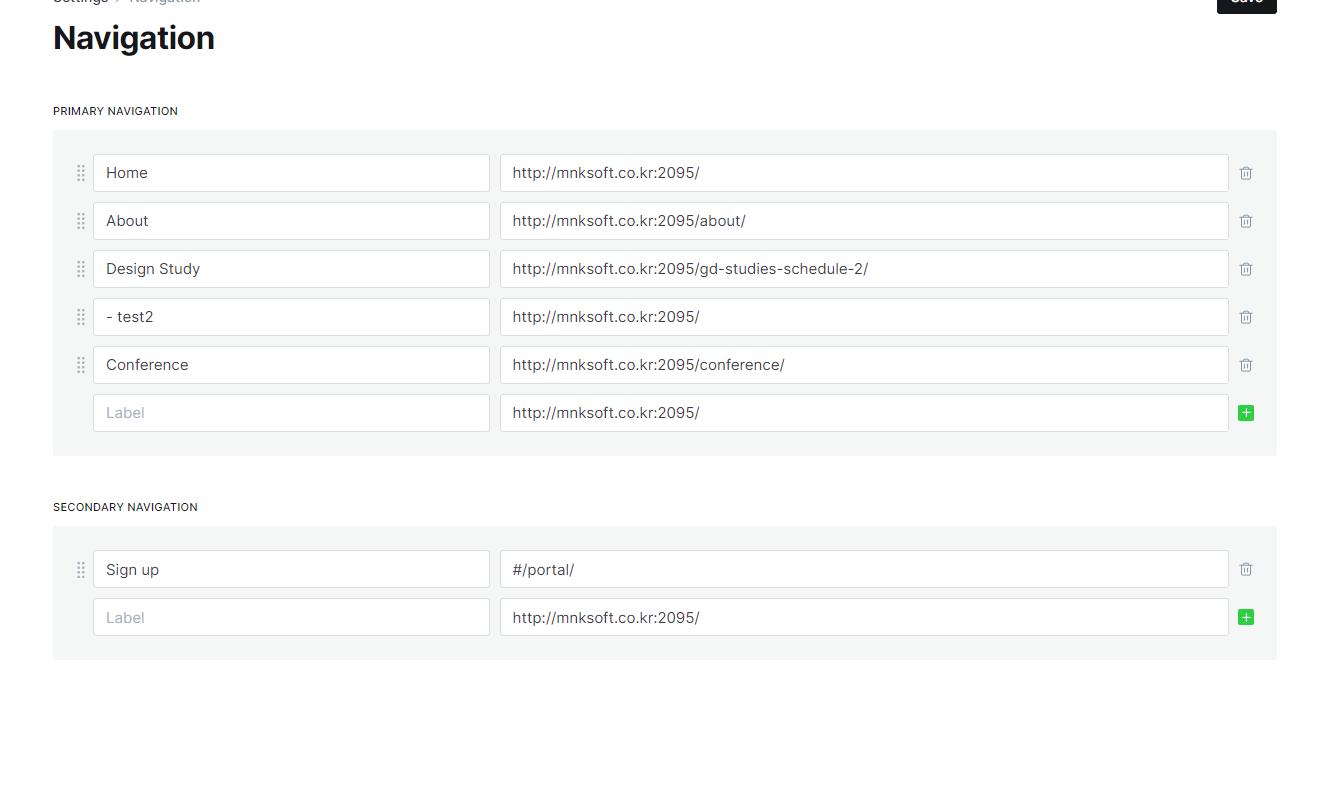
서브메뉴 세팅하는 법
test
<!-- for 코드강조 prism -->
<script src="https://cdnjs.cloudflare.com/ajax/libs/prism/1.29.0/prism.min.js" integrity="sha512-7Z9J3l1+EYfeaPKcGXu3MS/7T+w19WtKQY/n+xzmw4hZhJ9tyYmcUS+4QqAlzhicE5LAfMQSF3iFTK9bQdTxXg==" crossorigin="anonymous" referrerpolicy="no-referrer"></script>
<script src="https://cdnjs.cloudflare.com/ajax/libs/prism/1.29.0/plugins/line-numbers/prism-line-numbers.min.js" integrity="sha512-BttltKXFyWnGZQcRWj6osIg7lbizJchuAMotOkdLxHxwt/Hyo+cl47bZU0QADg+Qt5DJwni3SbYGXeGMB5cBcw==" crossorigin="anonymous" referrerpolicy="no-referrer"></script>
<script src="https://cdnjs.cloudflare.com/ajax/libs/prism/1.29.0/plugins/autoloader/prism-autoloader.min.js" integrity="sha512-SkmBfuA2hqjzEVpmnMt/LINrjop3GKWqsuLSSB3e7iBmYK7JuWw4ldmmxwD9mdm2IRTTi0OxSAfEGvgEi0i2Kw==" crossorigin="anonymous" referrerpolicy="no-referrer"></script>
<script>document.body.className += ' ' + 'line-numbers';</script>

<!-- for 수식 KaTex -->
<script defer src="https://cdn.jsdelivr.net/npm/[email protected]/dist/katex.min.js" integrity="sha384-z1fJDqw8ZApjGO3/unPWUPsIymfsJmyrDVWC8Tv/a1HeOtGmkwNd/7xUS0Xcnvsx" crossorigin="anonymous"></script>
<script defer src="https://cdn.jsdelivr.net/npm/[email protected]/dist/contrib/auto-render.min.js" integrity="sha384-+XBljXPPiv+OzfbB3cVmLHf4hdUFHlWNZN5spNQ7rmHTXpd7WvJum6fIACpNNfIR" crossorigin="anonymous"></script>
<script>
    document.addEventListener("DOMContentLoaded", function() {
        renderMathInElement(document.body, {
          // customised options
          // • auto-render specific keys, e.g.:
          delimiters: [
              {left: '$$', right: '$$', display: true},
              {left: '$', right: '$', display: false},
              {left: '\\(', right: '\\)', display: false},
              {left: '\\[', right: '\\]', display: true}
          ],
          // • rendering keys, e.g.:
          throwOnError : false
        });
    });
</script>

<!-- for dropdown menu -->
<script>
(function() {
const mediaQuery = window.matchMedia('(max-width: 991px)');

// IMPORTANT: For themes other than Casper, change the selector just below to select your theme's header menu selector
const menu = document.querySelector('.gh-head-menu');
const nav = menu.querySelector('.nav');
if (!nav) return;

// IMPORTANT: For themes other than Casper, change the selector just below to select your theme's header logo selector
const logo = document.querySelector('.gh-head-logo');
const navHTML = nav.innerHTML;
if (mediaQuery.matches) {
const items = nav.querySelectorAll('li');
items.forEach(function(item, index) {
item.style.transitionDelay = 0.03 * (index + 1) + 's';
});
}

const makeHoverdown = function() {
if (mediaQuery.matches) return;
var dropDown_list = [],
latest_navigation_item,
// IMPORTANT: For themes other than Casper, change the selector just below to select your theme's header menu item selector
nav_list = document.querySelectorAll('.gh-head-menu li');
var newMenuList = [];
var menuTree = {};

nav_list.forEach((item, index) => {
if (item.childNodes[0].innerText.startsWith('-')) {
if (menuTree[newMenuList.length - 1]) {
menuTree[newMenuList.length - 1].push(item);
} else {
menuTree[newMenuList.length - 1] = [item];
}
} else {
newMenuList.push(item);
}
});

nav_list = newMenuList.map((item, index) => {
if (menuTree[index]) {
let dropdown = document.createElement('ul');
dropdown.className = 'isDropDown';
menuTree[index].forEach(child => {
dropDown_item_text = child.childNodes[0].innerText;
child.childNodes[0].innerText = dropDown_item_text.replace('- ', '');
dropdown.appendChild(child);
});
item.className += '--hasDropDown';
item.appendChild(dropdown);
}
return item;
});
}

imagesLoaded(logo, function() {
makeHoverdown();
});

window.addEventListener('resize', function() {
setTimeout(function() {
nav.innerHTML = navHTML;
makeHoverdown();
}, 1);
});

})();
</script>
prism 사용법


file upload error
 KKhaoSZ
image upload

location ^~ /blog {

                client_max_body_size 10G; # Required for uploading large files

                proxy_set_header X-Forwarded-For $proxy_add_x_forwarded_for;
                proxy_set_header Host $http_host;
                proxy_set_header X-Forwarded-Proto $scheme;
                proxy_pass http://127.0.0.1:2368;
        }
파일 사이즈 늘리는건 요걸로 하면 됩니다.
고스트 백업
메뉴얼 백업 순서
자동 백업
 Kenton Vizdos
 iamsmkr
우리도 이런 필요한것들 미리만들어 놓으면 좋을듯
코스트에서
심지어 full page html이 가능하다면.... 웹사이트로 이용해도 될것 같음
 Dale Seo
콤포즈에서 외부네트워크 사용 방법 한번더 확인해봐야됨
테이블 설정
문제해결
macOS Sierra에서 업데이트 후 키보드 한글 입력 상태에서는 백 쿼트(`) 키를 누르면 원화(₩)가 입력된다.
한글 입력 상태에서는 옵션키와 함께 백 쿼트(`)키를 눌러야 백 쿼트(`)를 입력 할 수 있다.
마크다운 문서를 작성하는 사람이나 개발자에게는 매우 불편하다.
# 해결 방법
- ~/Library 폴더로 이동해서 KeyBindings 폴더를 추가한다.
- ~/Library/KeyBindings 폴더에 DefaultkeyBinding.dict 파일을 만든다.
- DefaultkeyBinding.dict 파일에 아래의 코드를 추가한다.{ "₩" = ("insertText:", "`"); }
- 각 애플리케이션들을 새로 실행하면 한글 입력 상태에서도 백 쿼트(`)가 입력되는 것을 확인할 수 있다.